Category: Seller Guide
How to Become an Exporter in India and Sell Abroad on Tradoi
By Tradoi Team · Published 2026-04-18 · Updated 2026-08-21
Becoming an exporter in India starts with one registration: the Import Export Code (IEC), a 10-digit number from the Directorate General of Foreign Trade (DGFT) that authorizes a business to ship goods abroad. Once you hold it, the second half is making your business easy to find for buyers outside India. That second half is what this guide is really about.
On Tradoi, an export-ready seller turns up when buyers in the Gulf, Southeast Asia, Africa, Europe, or North America search for trusted Indian suppliers. The IEC earns the Export Ready badge those buyers filter for, and switching on export puts your Digital Store in front of them.
One thing to settle before we start. An IEC adds to your account; it does not replace your verification. You still need a verified business to sell on Tradoi at all, and the IEC sits on top once you are ready to ship across borders. The path runs in order: get your IEC from DGFT, get verified on Tradoi, set your reach to export and pick the countries you serve, then add and verify your IEC.
What You'll Need
- An Import Export Code (IEC), the one-time registration from DGFT that lets an Indian business export
- A verified Tradoi seller account, since export builds on top of your existing verification
- Your IEC certificate as a PDF, up to 10 MB, to upload under Documents
- The list of countries you want to ship to
What Is an IEC and Do I Need One?
An Import Export Code is a 10-digit registration issued by India's DGFT that authorizes a business to import or export goods. If you plan to sell to buyers outside India, you need one. It is issued once and stays valid for the life of the business, so there is no renewal fee and no subscription. It does ask for one piece of yearly attention, though: as of 2026, DGFT requires every IEC holder to confirm or update their details electronically on dgft.gov.in between April and June each year, even when nothing has changed. Miss the window and DGFT deactivates the code; complete the updation and it comes back.
You apply for it directly on the government portal, and you do not need an agent to do it for you. It is the single legal credential that makes you an exporter on paper. Everything else in this guide is about turning that credential into orders.
How Do I Get an Import Export Code?
A one-time registration, kept active by a short annual confirmation on the DGFT portal.
If you do not already hold an IEC, you apply on the DGFT portal yourself. Have your documents ready first and the form moves quickly.
- Get your documents together before you start: your business PAN, your Aadhaar for e-KYC, a cancelled cheque or bank certificate, and an address proof.
- Go to the official DGFT portal at dgft.gov.in, open Services, and choose Apply for IEC. Sign in with your business PAN and verify by OTP.
- Fill in your business and bank details, then pay the government application fee online by UPI, card, or net banking.
- Submit, and DGFT issues the IEC to you by email and as a PDF you can download from the portal.
- Check that the business name on your PAN matches your other documents exactly. A name mismatch is the most common reason an application is held up.
- Once you hold the code, put the annual updation in your calendar: confirm or update your IEC details on the DGFT portal between April and June every year, even if nothing has changed. A missed window deactivates the code, and completing the updation reactivates it.
How Do I Start Exporting on Tradoi?
With the IEC in hand, the rest happens on Tradoi, and it runs in a clear order. You get verified, you set your reach to include export and pick the markets you ship to, then you add and verify your IEC. Each step builds on the one before it, and the last one is what earns the Export Ready badge.
The three steps below take you from a verified domestic seller to one that shows up when a buyer, in India or abroad, turns on the Export Ready filter.
Become a Verified Seller First
The base your export reach is built on. Nothing exports until this is done.
Export is a layer on top of a verified store, not a shortcut around it. If you are not on Tradoi yet, set up your store first, because your IEC has nothing to attach to until your business is verified.
- Sign up, verify your phone and email, and verify your business. This is the same multi-layer verification every seller clears before they can list.
- Build your Digital Store and list a few real products, so a foreign buyer who finds you lands on a complete page worth contacting.
- New here? Follow How to Register as a Seller on Tradoi end to end, then come back to this guide.
Set Your Reach and Pick Your Markets
Tells Tradoi you sell across borders, and which markets you ship to.
Your reach setting controls who sees you. To open the export path, your reach has to include buyers outside India. Countries live inside this same control, so you pick your markets here, before you touch the IEC upload.
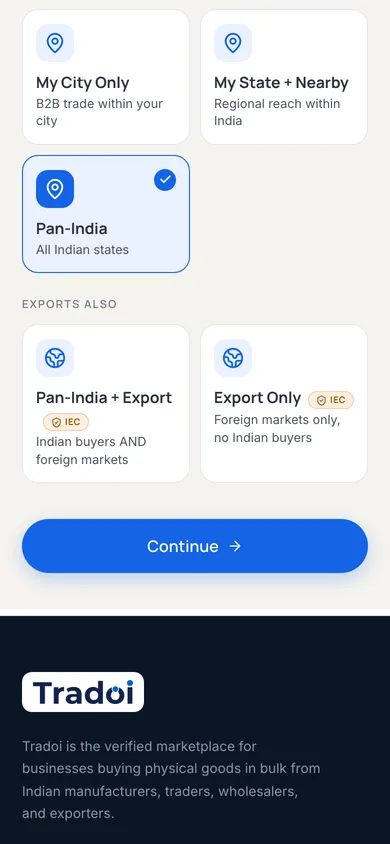
- Open the reach control, during first setup or later in Edit My Store, and choose Pan-India + Export if you sell at home and abroad, or Export Only if you sell to foreign buyers alone.
- Pan-India + Export keeps you in front of your domestic buyers while adding international reach, so most exporters choose it.
- The moment you pick an export option, a list of twelve popular destinations appears. Tick every market you actually ship to. The form will not let you save an export reach with none selected.
- Saving this sets your intent. The IEC upload in the next step is what makes it real.
Add and Verify Your IEC
Earns the Export Ready badge buyers can filter for.
Now you attach the credential. You upload your IEC certificate under Documents, its own section inside your seller dashboard.
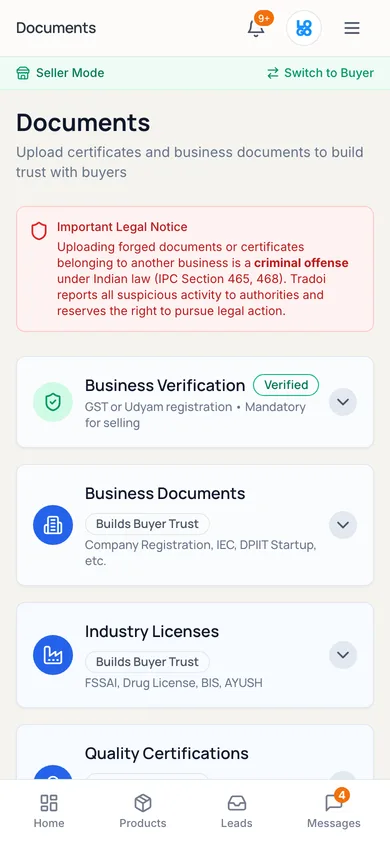
- Open Documents from the sidebar on desktop, or tap Docs in the bottom bar on mobile, and start a new upload.
- Choose Import Export Code (IEC) as the document type and pick your certificate. It has to be a PDF, up to 10 MB.
- Tradoi reads your IEC number and details from the certificate. Check that everything matches, then save.
- If it verifies cleanly, the Export Ready badge appears on your Digital Store right away. If it needs a closer look, it goes to a quick manual review and you hear back by email.
Where the Export Ready Badge Comes From
Your country list is not what puts your Digital Store in front of foreign buyers. The Export Ready badge does that, and it comes from two things together: export switched on, and a verified IEC. Buyers filter on Export Ready in search, so your store turns up for them whether you picked two markets or ten.
- Set your country list to the markets you can genuinely supply, the same way you set your domestic reach. It is part of your reach setting, not a separate promise.
- You can change it any time in Edit My Store, under the same reach control you used during setup.
- If you chose Pan-India + Export, your domestic buyers still see you throughout. Export adds reach; it does not pull you out of your home market.
What an IEC Is and Isn't on Tradoi
A lot of sellers assume an IEC is some kind of verification upgrade. It isn't, and knowing where it fits saves real confusion. It is an export credential and nothing more.
- Not a Replacement for Business Verification: every Tradoi seller verifies their business first, and an IEC on its own will not activate your store or your listings.
- Not a Verification Tier: tiers reflect how deeply your business is verified, and the IEC plays no part in that. See Tradoi's verification tiers, explained.
- Not Verified Standing: your verified standing comes from verifying your phone, email, and business, and from how you trade over time, not from holding an IEC.
Ready to Sell Across Borders? Get verified, set your reach to export, and add your IEC to make your Digital Store Export Ready for buyers anywhere. Start Selling, Free
What International Buyers Expect
Cross-border buyers look for more than the badge. Set your store up the way they expect, and the inquiries convert into orders. Then go where those buyers are: our guide to finding international buyers for your export products walks the five channels that reach them and what each one costs.
- Market-Specific Certifications: CE for the EU, FDA for the US, Halal for the Gulf, and ISO 9001 across the board. Add the ones your buyers' markets require.
- Comfort With Export Paperwork: the commercial invoice, the packing list, and the certificate of origin. Buyers trust a supplier who handles these without friction.
- An MOQ and Lead Time That Account for Freight: usually a higher minimum order, and a few extra weeks to allow for ocean shipping.
An IEC does not change your verification. It adds the Export Ready badge that buyers can filter for.
Conclusion
Becoming an exporter on Tradoi comes down to four moves: get your IEC from DGFT, get your business verified, set your reach to include export and pick the countries you serve, then add and verify your IEC. The Export Ready badge does the rest, since it is the trust signal buyers can filter for. Keep your business verification current, confirm your IEC details in DGFT's April to June updation window each year, and line up the certifications your buyers expect in their market, and you are set to win cross-border inquiries right alongside your domestic ones.
Common Questions
How do I become an exporter in India?
Apply for an Import Export Code (IEC) on the official DGFT portal at dgft.gov.in. It is a 10-digit registration that authorizes an Indian business to export, and it is issued once for the life of the business. You apply with your business PAN, Aadhaar for e-KYC, bank details, and an address proof, and you do not need an agent. After that, confirm your IEC details on the portal each April to June to keep the code active.
How do I start exporting on Tradoi?
First become a verified seller. Then set your reach to Pan-India + Export, or Export Only, and pick the countries you ship to in the same step, since the reach will not save without at least one. Last, add and verify your IEC under Documents. Once your IEC is verified, your Digital Store carries the Export Ready badge and becomes visible to international buyers searching for trusted Indian suppliers.
What is an IEC and do I need one to export?
An IEC, or Import Export Code, is a 10-digit registration from India's DGFT that authorizes a business to import or export goods. If you want to sell to buyers outside India, you need one. It is the single legal credential that makes you an exporter on paper, and on Tradoi it earns the Export Ready badge buyers can filter for.
Does an IEC need to be renewed every year?
There is no renewal fee, but there is a mandatory annual updation. As of 2026, DGFT requires every IEC holder to confirm or update their details electronically on dgft.gov.in between April and June each year, even if nothing has changed. Missing the window deactivates the code, and customs will not clear export shipments on a deactivated IEC. Completing the updation reactivates it.
Does an IEC replace business verification on Tradoi?
No. An IEC sits on top of your business verification; it does not replace it. Every Tradoi seller verifies their business before they can list, and an IEC on its own will not activate your store or your listings. You get verified first, then add your IEC to open up export.
How much does it cost to add an IEC to Tradoi?
Adding your IEC and earning the Export Ready badge on Tradoi is free. The only cost is the government application fee you pay DGFT when you apply for the code itself. Check the current fee on the official DGFT portal, since it is set by the government and can change.
Does an IEC raise my verified standing or move me up a tier?
No to both. The IEC is not a verification tier, and it does not add to your verified standing. Verified standing comes from verifying your phone, email, and business, and from how you trade over time. Tiers reflect how deeply your business is verified. The IEC plays no part in either.
How long does IEC verification take on Tradoi?
If your IEC certificate verifies cleanly, the Export Ready badge appears on your Digital Store right away. If it needs a closer look, it goes to a quick manual review and you hear back by email. Uploading a clear PDF of the certificate, up to 10 MB, is the surest way to clear it on the first try.
Will switching on export hide me from my domestic buyers?
No. If you choose Pan-India + Export, you stay visible to buyers across India while also appearing to international buyers. Export adds reach rather than replacing your home market. Choose Export Only if you sell to foreign buyers alone.